> For the complete documentation index, see [llms.txt](https://help.form.io/llms.txt). Markdown versions of documentation pages are available by appending `.md` to page URLs; this page is available as [Markdown](https://help.form.io/dev/enterprise-form-builder-module/application-integration/react-applications.md).
# React Applications
Integrating the Enterprise Form Builder Module in a React application.
Within a React application, the Enterprise Form Builder Moduler provides a suite of components and hooks that enable form building within an application while using the enterprise features available in Form.io.
In keeping with React application building conventions, it is a collection of components and does not utilize any third party routing or state management. Those capabililites remain in the domain of the application using the components.
All of the core interaction with the Form.io server is separated into hooks, so they can be used independent of the the UI components provided.
To begin using the Enterprise Form Builder Module within a React application, complete the following steps:
## Installation
To install the React Enterprise Form Builder package, use the following command:
```bash
npm install @formio/enterprise-form-builder-react
```
### **Required Peer Dependencies**
This package relies on both `@formio/react` and `@formio/js` as peer dependencies. They must be installed in the project if they are not already present:
```bash
npm install @formio/react @formio/js
```
Make sure the versions of `@formio/react` and `@formio/js` meet the minimum requirements specified in the package's `peerDependencies`.
## Setup
To use the Enterprise Form Builder in a React app, configure the required context providers at the top level of the application, just as in the `react-efb-demo` app.
The `EnterpriseFormBuilderProvider` must be a child of the `FormioProvider` in the application's component tree. Configure the `Formio` library with the license key and any additional client libraries.
Here is a minimal example of how to wrap an application:
```jsx
import React from 'react';
import { EnterpriseFormBuilderProvider } from '@formio/enterprise-form-builder-react';
import { FormioProvider } from '@formio/react';
const licenseKey = 'YOUR_ENTERPRISE_LICENSE_KEY'; // Replace with your license key
function App() {
return (
{/* Your app content and routing here */}
);
}
export default App;
```
**Notes:**
* The `FormioProvider` sets up Form.io project context for all children.
* The `EnterpriseFormBuilderProvider` enables the enterprise builder features and requires a valid license key.
* The `tag` prop is used to group forms that are available to the Enterprise Form Builder. New forms will be added with this tag and only Forms with the tag will be displayed.
* Wrap your app's router or main content with these providers.
## User Authentication
User authentication is required to support form management within a project.
These steps will configure the project to have a User role that will manage the forms:
1. From the Developer Portal, open the associated project.
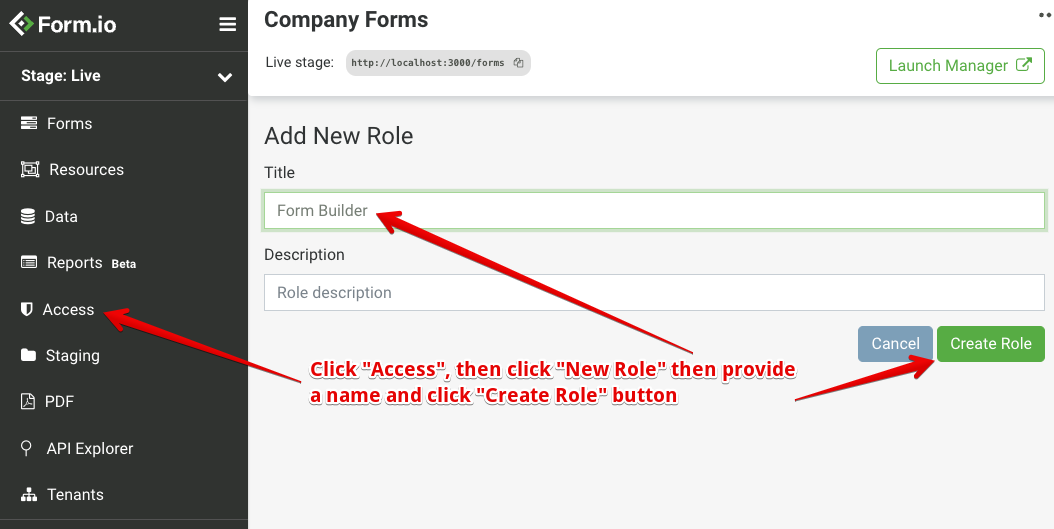
2. Navigate to **Access**, then click **New Role** under the list of existing Project Roles.
3. Enter the title *Form Builder* and click **Create Role**.\
The screen should return to the Access page.
{% hint style="info" %}
Refer to [Roles documentation](/how/role-based-conditions.md#create-roles) for additional information.
{% endhint %}
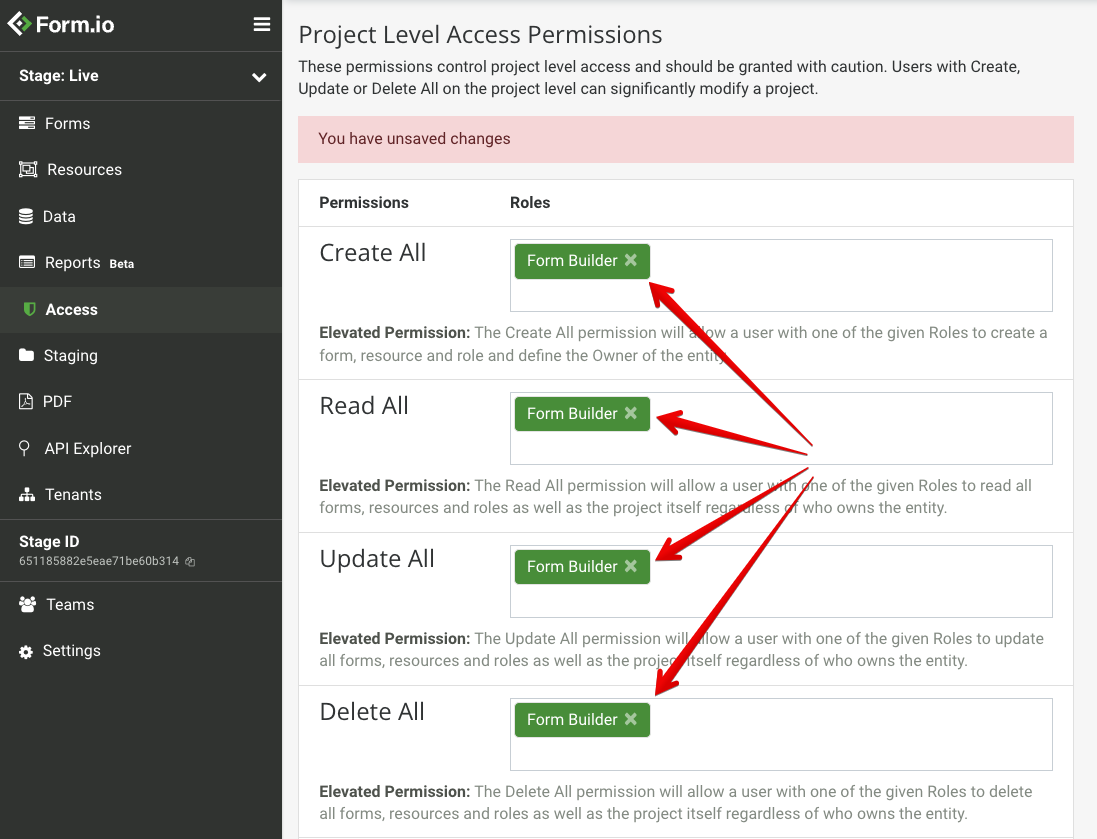
4. On the **Access** page, add the Form Builder role to the following Permission groups:
1. Create All
2. Read All
3. Update All
4. Delete All
5. Configure the Project to add these roles to the authenticated users group. Do this using the [SSO configurations](/dev/authentication-and-authorization/saml.md#introduction), or using [Form.io Authentication](/dev/authentication-and-authorization.md#user-authentication).\
Either option requires modifying the User Login form to enable this authentication.
Once the Form.io project is appropriately configured, configure authentication within the host application. The documentation for setting up Authentication within an Angular application can be found at the [Angular Authentication Documentation](https://help.form.io/dev/application-development#user-authentication).
With this route in place, application users can authenticate into the app and subsequently be authenticated into the Form.io Project with the appropriate privileges.
## Error Handling
There are two ways to handle errors that come from the Enterprise Form Builder components:
* Each component has an `onError` callback function to allow you to handle the error as needed.
* If the `onError` callback is not provided, the error will be thrown. This allows you to use a global error handler such as a [React Error Boundary](https://react.dev/reference/react/Component#catching-rendering-errors-with-an-error-boundary) to catch and handle errors in your application.
## Providers
The [EnterpriseFormBuilderProvider](/dev/enterprise-form-builder-module/application-integration/react-applications/react-context-provider.md) is the context provider for enterprise form builder functionality. Refer to the [React Context Provider](/dev/enterprise-form-builder-module/application-integration/react-applications/react-context-provider.md)reference for more information.
## Components
The following components are available within React apps. Refer to the [React Component Reference](/dev/enterprise-form-builder-module/application-integration/react-applications/react-component-reference.md) for more detailed information.
* CreateForms - Visual form builder interface for creating and editing forms
* FormList - Display and manage a list of forms with filtering
* FormViewer - Display a form for users to fill out and submit
* UseForm - Display a form with an existing submission for viewing or editing
* SubmissionList - Display a table of submissions for a form
* SubmissionViewer - View, edit, or delete a submission
* FormDelete - Confirmation dialog for deleting a form
* DeleteSubmission - Confirmation dialog for deleting a submission
* FormSettings - Edit form metadata (title, name, path, tags)
## Hooks
All hooks provided by the Enterprise Form Builder follow a consistent pattern: each hook returns an action function (such as `loadForm`, `saveForm`, `deleteForm`, etc.) that performs the associated operation, along with state properties that allow you to track the progress and result of the operation. These state properties typically include:
* `loading`: `boolean` — Indicates if the operation is currently in progress.
* `error`: `string | null` — Holds any error message if the operation fails, otherwise `null`.
* `success`: `boolean` — (For actions such as save or delete) Indicates if the operation was successful.
* Data property: The returned data from the operation, if applicable (such as `form`, `forms`, `submission`, etc.).
This pattern allows you to call the action function as needed (for example, in response to a button click or effect), and use the returned state properties in your component’s UI to provide feedback, handle errors, or display loading indicators.
The list of available hooks are listed below. Refer to the [React Hooks Reference](/dev/enterprise-form-builder-module/application-integration/react-applications/react-hook-reference.md) for more information:
* useEnterpriseFormBuilder - Access the enterprise form builder context
* useLoadForm - Load a single form by ID
* useLoadForms - Load multiple forms with optional query parameters
* useSaveForm - Save forms with optional conflict resolution
* useDeleteForm - Delete a form by ID
* useLoadSubmission - Load a single submission by form ID and submission ID
* useSaveSubmission - Save a submission
* useDeleteSubmission - Delete a submission
* useLoadProject - Load Form.io project information
---
# Agent Instructions
This documentation is published with GitBook. GitBook is the documentation platform designed so that both humans and AI agents can read, navigate, and reason over technical content effectively. Learn more at gitbook.com.
## Querying This Documentation
If you need additional information that is not directly available in this page, you can query the documentation dynamically by asking a question.
Perform an HTTP GET request on the current page URL with the `ask` query parameter, and the optional `goal` query parameter:
```
GET https://help.form.io/dev/enterprise-form-builder-module/application-integration/react-applications.md?ask=&goal=
```
`ask` is the immediate question: it should be specific, self-contained, and written in natural language.
`goal` is optional and describes the broader end goal you are ultimately trying to accomplish on behalf of the user. GitBook uses it to tailor the answer towards what is most useful for that goal.
The response will contain a direct answer to the question and relevant excerpts and sources from the documentation.
Use this mechanism when the answer is not explicitly present in the current page, you need clarification or additional context, or you want to retrieve related documentation sections.