> For the complete documentation index, see [llms.txt](https://help.form.io/llms.txt). Markdown versions of documentation pages are available by appending `.md` to page URLs; this page is available as [Markdown](https://help.form.io/form-building/actions/oauth-actions.md).
# OAuth Actions
Using OAuth actions to authenticate a Form user.
The OAuth action supports user authentication within the application against an OAuth provider. When a user authenticates, a window prompt will request the user to log into the configured OAuth provider’s website. The user will authenticate the user into the application with a successful login from the OAuth provider. This allows users to register and log in to the application without having to have an account within the application Project.
## Settings
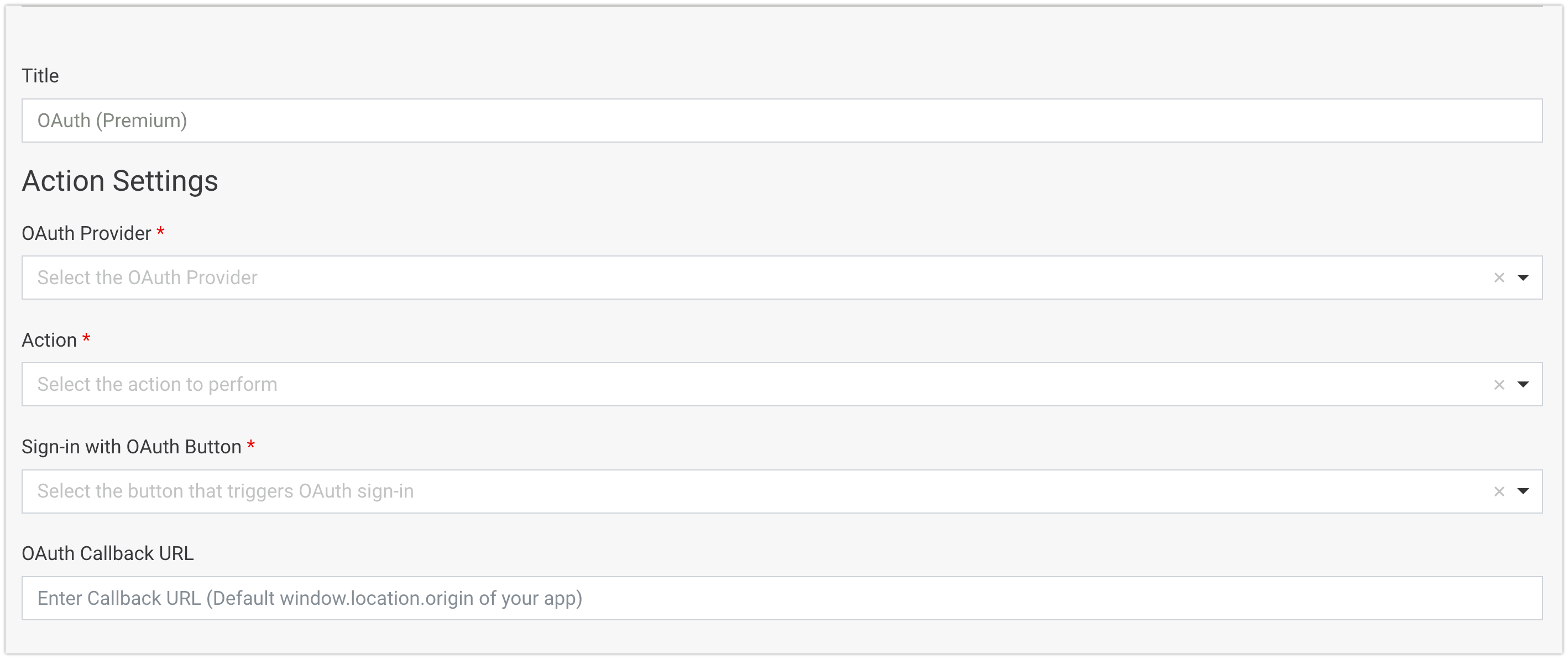
**OAuth Provider:** The OAuth Provider to authenticate against. This is the service that users will log into when authenticating via OAuth. You will need to register your application with these providers before you can use OAuth. See the [**OAuth guide**](/form-building/actions.md) for more information. We currently support the following OAuth providers:
* [**GitHub**](https://docs.github.com/en/apps/oauth-apps/building-oauth-apps/authorizing-oauth-apps)
* [**Facebook**](https://developers.facebook.com/documentation/facebook-login/web)
* [**Office 365**](https://www.microsoft.com/en-us/microsoft-365/compare-all-microsoft-365-products?activetab=tab:primaryr2)
**Action:** The action to perform after the user has authenticated against the OAuth provider. The available Actions are listed below:
* **Remote Authentication***:* This will log a user in based on their remote user account. Unlike the rest of the actions, it does not require creating a user resource submission in form.io. All permissions and ownership still work.
* **Login Existing Resource:** This will attempt to authenticate an existing resource via OAuth. Use this action for forms like Login forms. This will search for a user account that is linked to the authenticated OAuth provider account, and log them in.
* **Register New Resource** This will create a new submission and perform authentication against the new resource. Use this action for forms like Registration forms. This will create the user account, link the authenticated OAuth provider account, and log them in.
* **Link Current User:** This will link an OAuth provider account to the currently logged-in user. Use this to allow users who have authenticated via the [Authentication Action](/form-building/actions.md#action-authentication) with an email and password to also log in to their account via OAuth.
**Role:** The selected role will be added to all new resources created by the form with this Authentication Action.
**Sign-in with OAuth Button** In order to use the OAuth Action in a form, you must choose a [**Button component**](/form-building/actions.md#button) with the action setting `OAuth` to start the OAuth sign-in process. When a user clicks the provided button, the OAuth authentication process will begin by opening a popup of the OAuth provider login page.
Please note - When embedding the form into the renderer, append "?live=1" parameter at the end of the form embed URL to allow for the OAuth action to trigger properly
**Autofill Fields:** Depending on which OAuth provider you select, and if you select the *Register New Resource* action, a number of Autofill Field options may appear. These settings allow you to automatically retrieve data from the OAuth provider account that is used to authenticate and fill in fields in your form before the new resource is created. For example, a GitHub OAuth Registration form may use the Autofill Email Field to assign the email of the GitHub account that was used to authenticate into a field of the new Resource that is created.
Autofill Fields will not always guarantee that they will find a value to fill, as the OAuth provider account may not have any information. For example, a Facebook account may not always fill the Autofill Email Field because some Facebook accounts are created with phone numbers.
---
# Agent Instructions
This documentation is published with GitBook. GitBook is the documentation platform designed so that both humans and AI agents can read, navigate, and reason over technical content effectively. Learn more at gitbook.com.
## Querying This Documentation
If you need additional information that is not directly available in this page, you can query the documentation by asking a question.
Perform an HTTP GET request on the following URL with the `ask` and `goal` query parameters:
```
GET https://help.form.io/form-building/actions/oauth-actions.md?ask=&goal=
```
`ask` is the immediate question: it should be specific, self-contained, and written in natural language.
`goal` is what the user is ultimately trying to achieve, the reason they need the answer. Sharing it helps GitBook give you a better, more relevant answer. A goal is most helpful when it describes the outcome the user wants rather than restating the question. For example, with `ask=how do I create an API token`, a goal like `automate deployments from our CI pipeline` lets GitBook tailor the answer to that use case.
The response will contain a direct answer to the question and relevant excerpts and sources from the documentation.
Use this mechanism when the answer is not explicitly present in the current page, you need clarification or additional context, or you want to retrieve related documentation sections.